
FINN is Germany’s leading car subscription platform. Besides private customers, we also work with companies: our JobAuto team, where I work as a Business Development Manager, sells car subscriptions to employers as a mobility benefit for their teams. I joined FINN in October 2025 as a business development intern in the sales team and have been working full-time since February 2026.
Working closely with our sales team, I saw how much depends on good meeting notes. Our sales cycles are long and complex. A single deal often involves several decision-makers and a series of meetings over weeks or months. To move a deal forward, everyone on our side needs to know what was said, what was promised and what is still open. A good note-taker turns every call into something the whole team can search, share and ask questions about. Without one, the context lives in people’s heads and gets lost between meetings.
Why didn’t we just keep paying for our off-the-shelf note-taker?
We had been using a paid AI note-taker, and as a product it worked well. The problem was everything around it. The first issue was cost. At around $14 per user per month, the bill grew quickly as more teams started using it. The second, harder issue was compliance. For us, a compliant note-taker has to meet a few clear requirements:
- Everyone in the meeting is informed that it is being transcribed.
- Only a limited group of people can access the transcript.
- The LLMs that process transcripts don’t use them for training.
- Transcripts are stored in Europe.
With an external tool, tracking who had consented to what was difficult and messy. For a company that takes data protection seriously, “we think everyone agreed” is not good enough. We needed a setup that was affordable, compliant and flexible enough to fit how we actually work with transcripts, ideally one where the transcripts never left systems we already trust.
What we had to work with
The starting point was Gemini Notes, Google’s built-in note-taker for Google Meet. Since it lives inside Google Workspace, it fits the compliance setup we already have. The transcripts it produces are good. Gemini Notes also solves the consent problem at its source. Whenever a meeting is being transcribed, Google Meet shows an icon to everyone in the call, and participants get both a visual and an audio notice. If transcription is switched on from the start, people see the notice before they even join. Nobody has to keep track of who agreed to what, because everyone is informed automatically, inside a tool we already use.
What Gemini Notes doesn’t give you is flexibility. You get a transcript and a basic summary, but you can’t really work with that material: ask questions, shape the summary around what you care about, or reuse a structure for recurring meetings.
That is where Spaces came in. Spaces is FINN’s internal infrastructure for internally developed tools. Teams across FINN use it to build their own tools, tailored exactly to how they work, instead of adapting their processes to generic software. It’s part of a broader push at FINN to let people outside of engineering build their own solutions, which my colleagues described in Bringing Agentic AI from idea to scale. Because the connections were already in place, I could start building in a safe environment from day one. I didn’t have to solve authentication, data storage or access rules from scratch, and I could plug straight into existing databases.
What I built
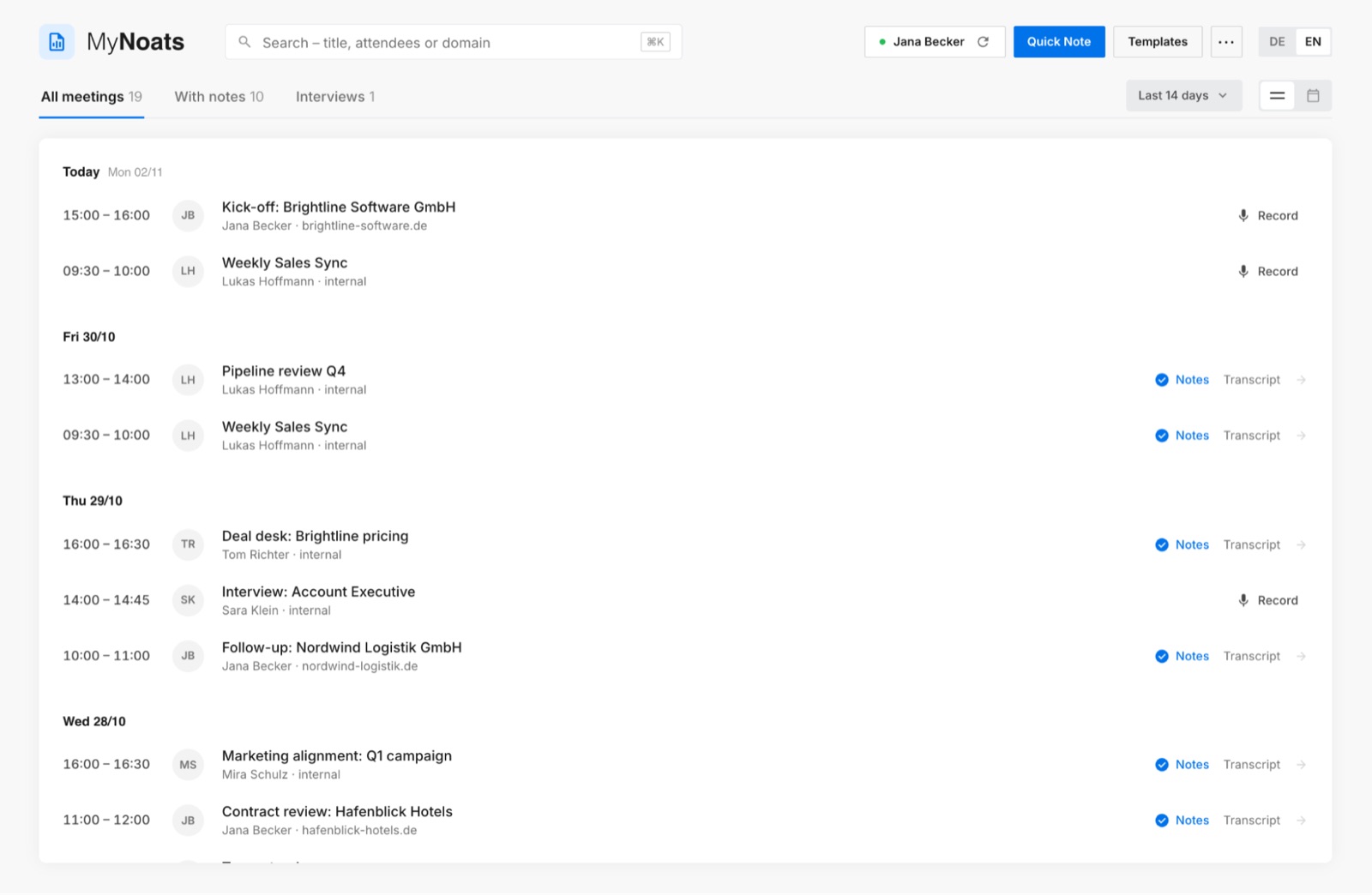
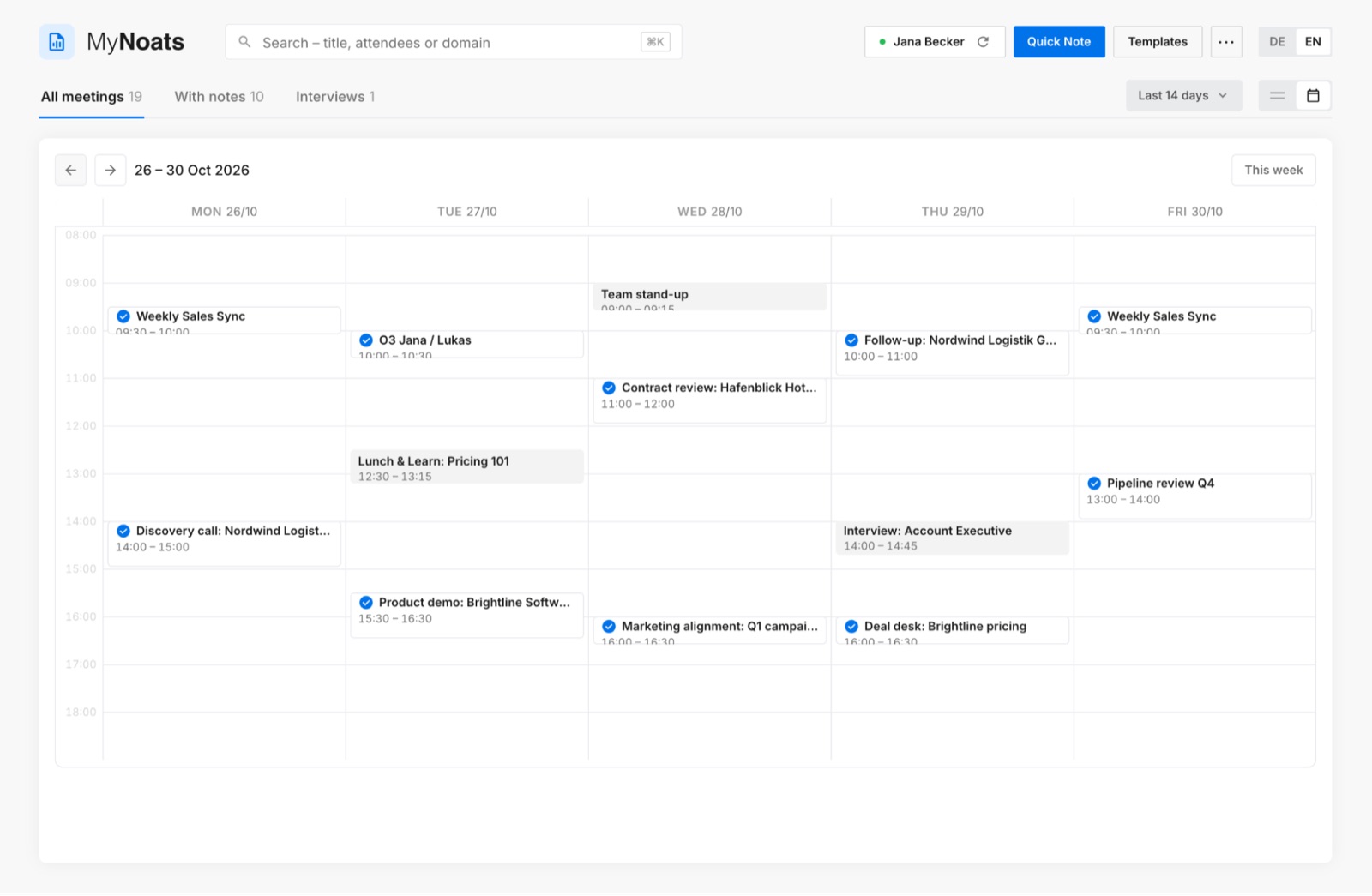
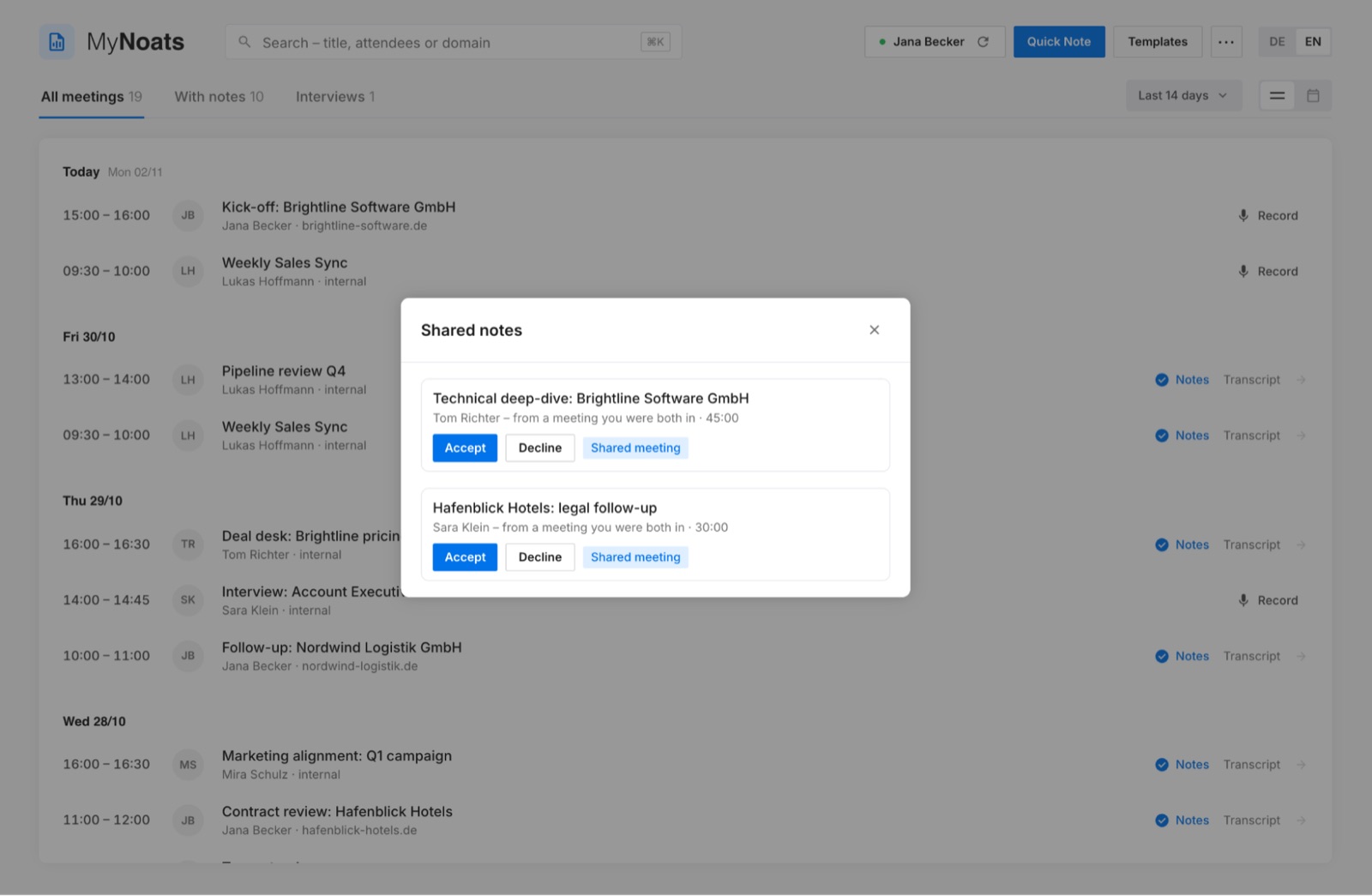
MyNoats is one place for everything that happens after a meeting. Instead of digging through Google Drive for a transcript, you open MyNoats and see all your meetings, either in a calendar view or a list view. A filter shows only the meetings that had Gemini Notes running, so you can jump straight to the ones with something to work with.
How it works under the hood
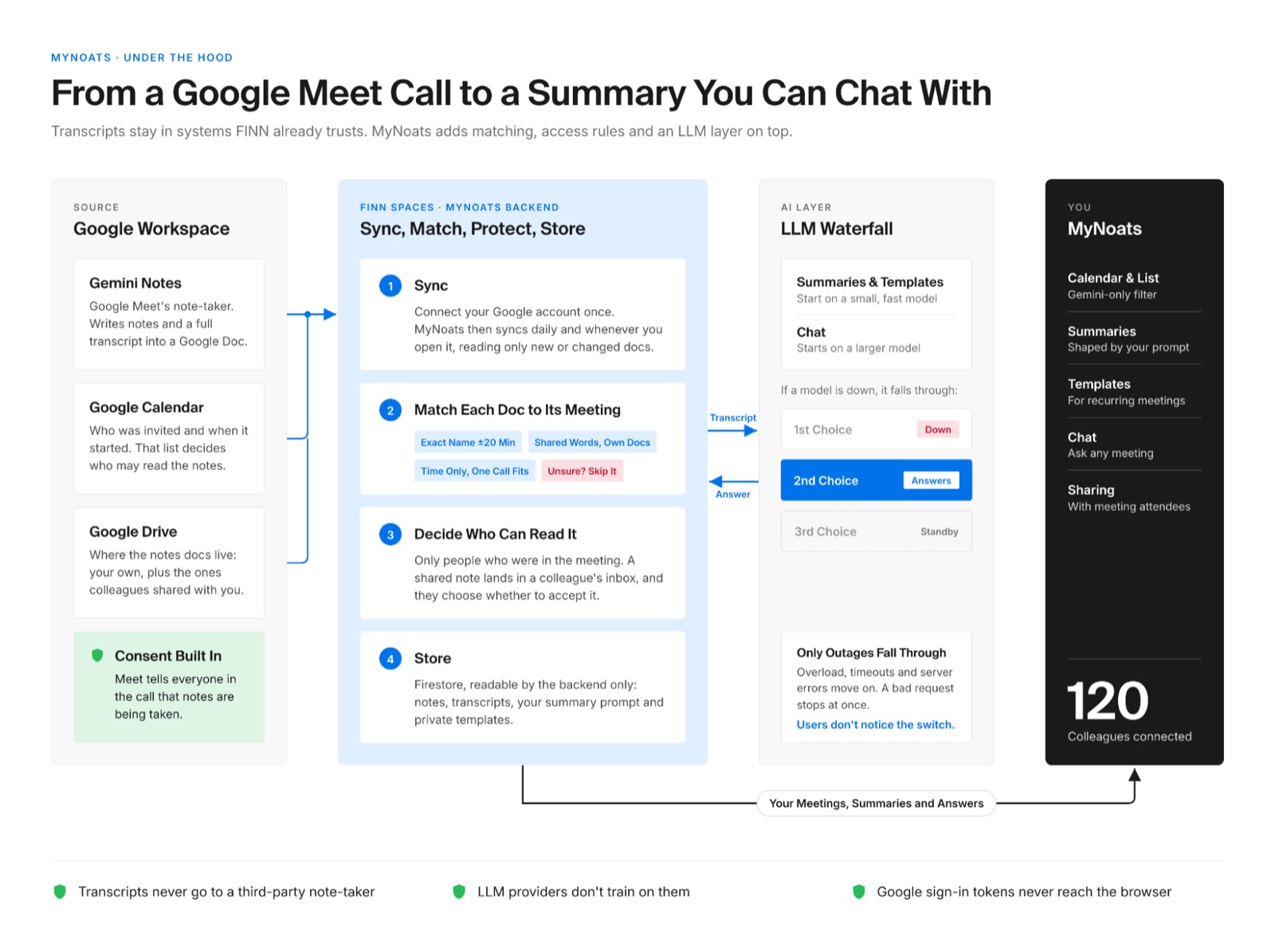
The flow behind MyNoats is simple. It reads your Google Calendar events and looks up the transcripts Gemini Notes saves to Google Drive. The matching logic then links each transcript to the right meeting, and the transcript goes through the LLM waterfall together with your personal prompt and, if set, the meeting’s template. What comes back, whether a summary or a chat answer, is stored in Spaces, which also handles login and access rules.
That setup also answers the question of where the data goes. Transcripts stay where Gemini Notes creates them, in our Google Workspace, which stores data in Europe. Access follows the same rules as our other internal tools: you only see the meetings you were part of and the notes others have explicitly shared with you. To generate summaries and answer chat questions, MyNoats sends the transcript to LLM APIs that process data in Europe and don’t use it for training. That way, every requirement from the start of this post is covered, without any meeting data ending up in a third-party note-taking app.
Summaries that focus on what you need. Each meeting has a deep-dive page with an automatically generated summary. You can shape these summaries on two levels. In your settings, you add a personal prompt that applies to every summary, so it always highlights what matters to you. A sales lead might want commitments and next steps; an engineering manager might want decisions and blockers. On top of that, templates give recurring meetings a fixed structure. You define the sections once, for example for sales calls or O3s (our regular one-on-ones between managers and their reports), and every summary of that meeting type follows the same format. That makes meetings easy to compare over weeks and months, for example to see how a deal has developed across several calls.
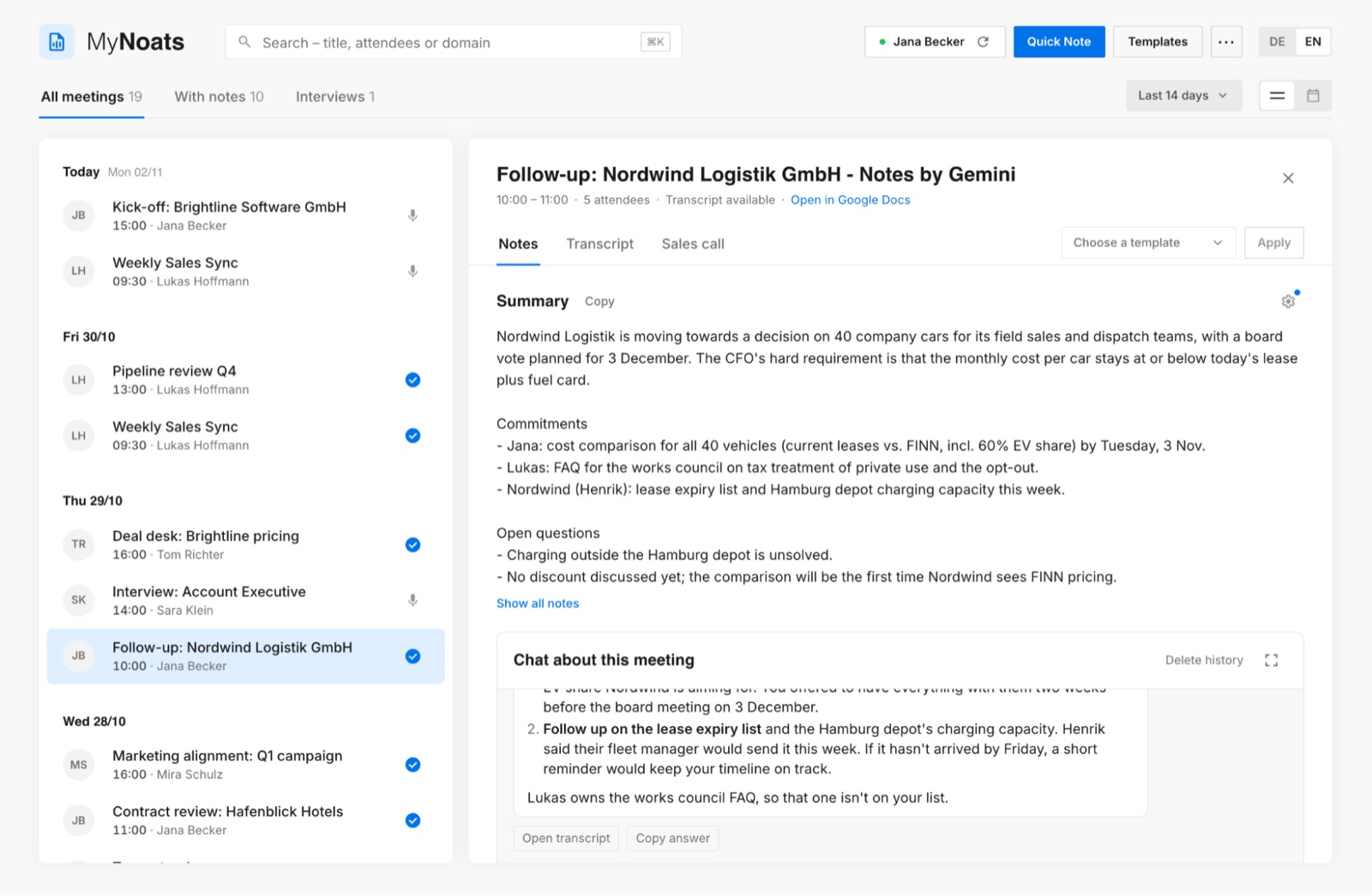
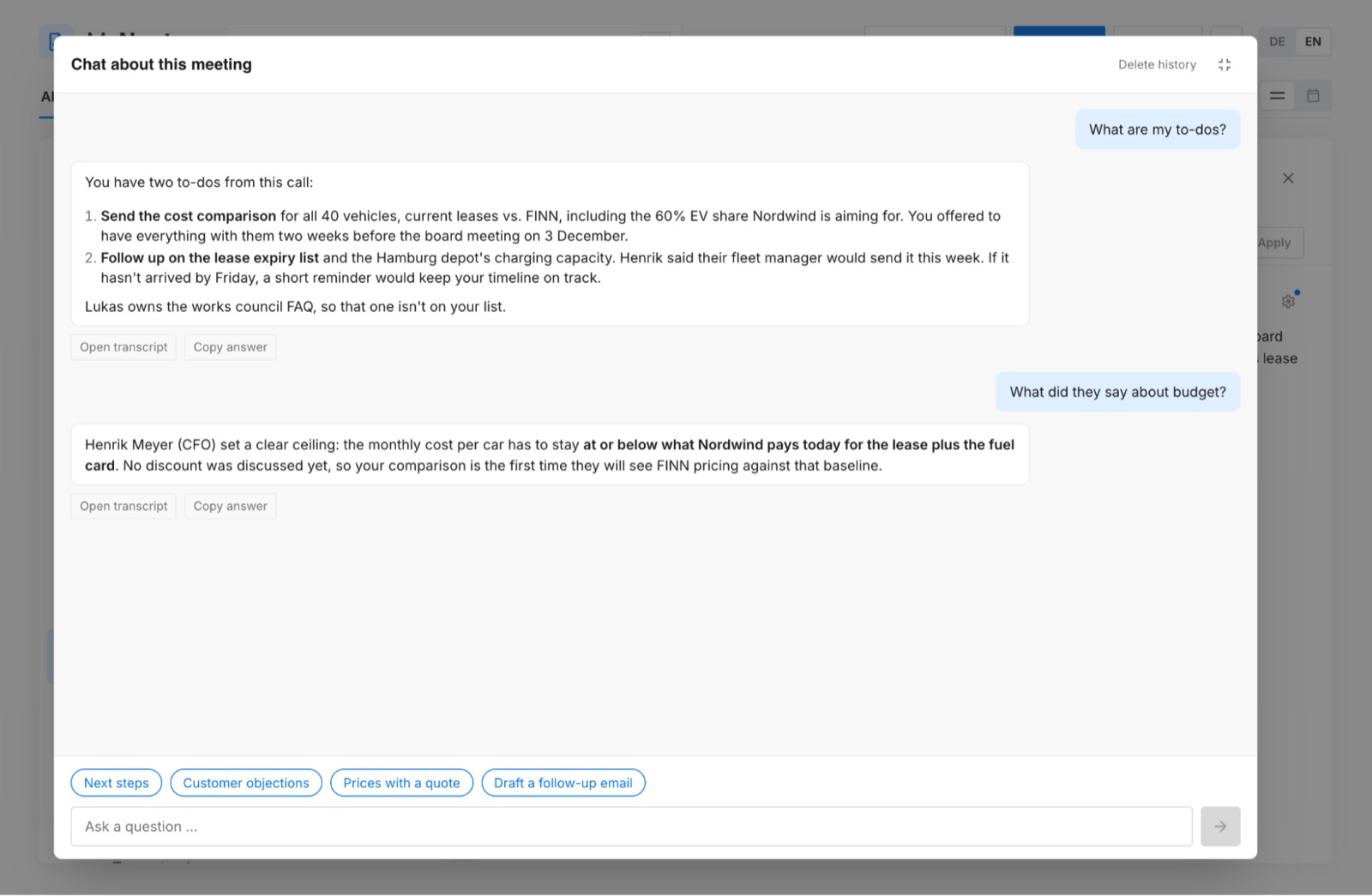
Chat with your transcript. You can ask questions about any meeting in plain language. “What are my to-dos?” is the most common one, but you can ask anything: what was decided about pricing or who raised the concern about timelines. In a sales context, this is especially useful before a follow-up call, when you need to remember exactly what a customer asked for three meetings ago.
Sharing. Because we own the tool, we can add things no off-the-shelf product would build for us. You can share a transcript with the other people who were in the meeting. It lands in their MyNoats inbox, and they can accept it and work with it like their own notes.
What I considered and left out
Gemini Notes only works in Google Meet. The obvious next step would have been support for Microsoft Teams and Zoom, which some customers prefer for external calls. I decided against it, at least for now.
The effort is high: each platform has its own audio handling, permissions and edge cases. Meanwhile, most of our meetings happen on Google Meet. Building for Teams and Zoom would have meant weeks of work for a small share of meetings. I’d rather make the core experience excellent first.
What was harder than expected
Balancing quality and cost. Every summary and every chat question costs money. The most capable models give the best answers but get expensive at scale. Cheaper models were fine for some tasks and noticeably worse for others. Their summaries often missed the right level of detail or misinterpreted what was said, which is a real problem when a sales team relies on them to prepare the next call. Finding the right model for each job took a lot of trial and error, mostly by running the same meetings through different models and comparing the results.
Planning for outages. LLM providers go down. If MyNoats depended on a single model, an outage would mean no summaries for anyone. So I built an LLM waterfall: a chain of models with similar quality, ordered by preference. If the first one doesn’t respond, the request automatically falls through to the next. Because the models in the chain produce comparable results, users never notice the switch.
Matching transcripts to meetings. This one surprised me most. Gemini transcripts often can’t be matched to a calendar event by name, only by time. That sounds simple until you have back-to-back meetings, meetings that run over, or two events at the same time. Getting the mapping right was essential, because a summary attached to the wrong meeting is worse than no summary at all.
The breakthrough came when I stopped treating the file names as random. Gemini names its documents in a few fixed ways, depending on how the meeting was set up. A meeting started from the calendar invite gets a title like Sales x JobAuto | Cross Selling – 2026/07/27 16:30 CEST – Notes by Gemini: the meeting name, the moment note-taking started, and a suffix that becomes Notizen von Gemini for German calls. A call someone joined through a Meet link gets only Meeting started 2026/08/12 10:05 CEST – Notes by Gemini, with no name at all. A call that was only transcribed, not summarized, gets a separate … – Transcript document. So MyNoats reads the name and start time out of the title and matches in three steps, from the strongest evidence to the weakest. First, it looks for a calendar event with exactly that name that started within 20 minutes. If the organizer renamed the event or Gemini shortened a long title, it falls back to events that share at least two words with the title, but only if one of them clearly wins. Documents without a name are matched by time alone, and only when a single Google Meet call fits within 30 minutes. If two meetings are still equally likely, MyNoats doesn’t guess: the transcript stays unmatched and can be added by hand.
What it cost
MyNoats was fully bootstrapped. I built it solo in about two weeks, and it was never on a roadmap. It started as an exploration: could we get the value of a paid note-taker out of transcripts we already had, inside infrastructure we already trusted?
The running costs answered that question. MyNoats costs us about $1.50 per user per month, almost entirely LLM API costs. Compared to $14 per user for a paid note-taker, that’s a difference of roughly $1,250 per month for 100 users, or about $15,000 per year.
The freedom of a side project mattered too. Without a fixed spec, I could follow what turned out to be useful, drop what didn’t, and ship features as soon as they worked. It’s the same idea behind our hackathons: progress over polish.
Where it is now and what’s next
Today, 120 people at FINN have connected to MyNoats. For an exploratory side project, that tells me it solves a real problem.
The next step is hiring. Interviews have a lot in common with sales calls: several people meet the same candidate, and everyone needs a clear, shared picture afterward. The goal is to make MyNoats the working space for interviews at FINN:
- Interviewers take notes in MyNoats during the interview.
- They add their hiring decision.
- MyNoats turns the notes into structured feedback that focuses only on job-relevant skills and experience.
- The feedback is matched directly to the role’s scorecard.
The aim is feedback that is objective and free of bias. Every candidate is assessed against the same criteria, personal characteristics play no role, and decisions are based on what someone can actually bring to the role. For interviewers, it also means feedback that is faster to write, more structured and easier to compare across candidates.
If I did it again, I’d invest earlier in the unglamorous parts: transcript matching and model fallbacks. They decide whether people trust the tool, and trust is what turns a side project into something 120 colleagues choose to connect to.
Have you built your own tooling on top of meeting transcripts, or found a setup that handles consent well? I’d love to hear how you approached it.
This article was written by Georg Wiens.